You upload a photo to Instagram and an "AI info" label appears on your post — even though the photo is entirely yours and you only made a small touch-up. This guide explains why the label shows up and how to remove the data that triggers it without any quality loss.
Why does the label appear?
Instagram (like TikTok and X) doesn't judge your pixels — it reads the metadata embedded inside the file. Two blocks trigger the label:
- C2PA Content Credentials — the "content provenance" record that tools like Photoshop, Firefly and DALL·E embed. It logs every AI-assisted edit, including a single use of generative fill.
- IPTC DigitalSourceType — a field that marks the file as "trainedAlgorithmicMedia".
So if you erased a trash can with Samsung's or Pixel's AI eraser, or touched generative fill once in Photoshop, your photo carries this invisible stamp.
Removing the label = cleaning the metadata
Because the label lives in metadata, not pixels, the fix is straightforward: strip the C2PA, XMP and IPTC blocks from the file. Done correctly, this is lossless — resolution, colors and sharpness stay bit-for-bit identical, because the pixel data is never even decoded.
SwapFile's AI label cleaner does this entirely in your browser:
- Drop your photo on the page — it never leaves your device, nothing is uploaded.
- Pick what to remove: C2PA, GPS location, device info, capture time.
- Check the before/after table to see exactly which fields get removed.
- Download the clean copy and post that one to Instagram.
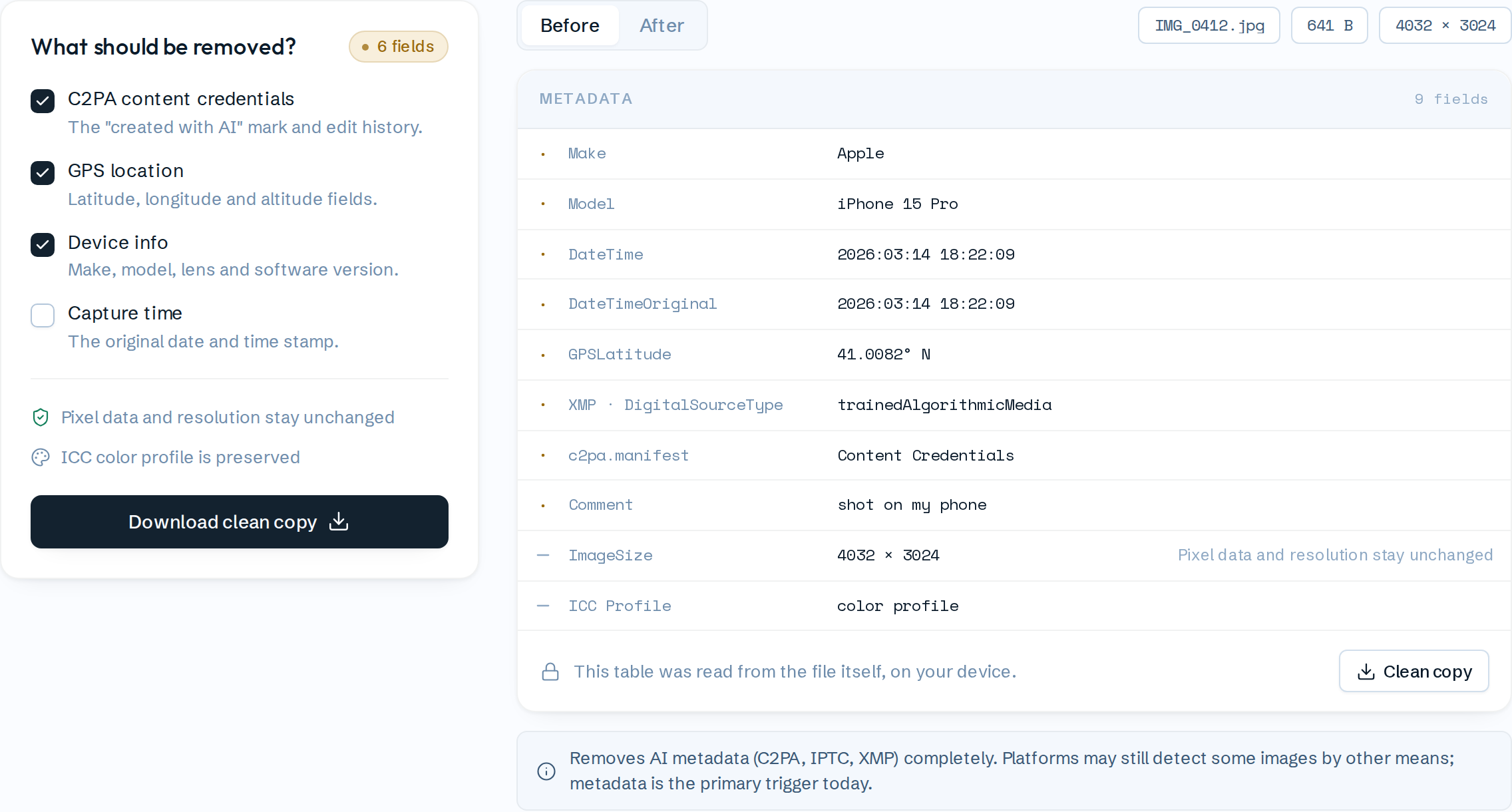
Skeptical? Open your browser's network tab and verify it yourself: no request ever carries your photo.
Frequently asked
Does quality drop? No. Cleaning only rewrites the metadata sections; pixels are copied byte-for-byte. The ICC color profile is preserved too, so colors don't shift.
Is this legal? Managing the metadata of your own photos is entirely your right — the same category as phones stripping GPS data for privacy. Removing metadata doesn't change the image's ownership or licensing.
Is it 100% guaranteed? Honest answer: today, metadata is the primary trigger for the label, and cleaning removes it completely. But platforms are also experimenting with other detection methods (like invisible watermarks) — be skeptical of any tool that promises absolute guarantees.
Bonus: location and device data go too
The same cleanup can remove GPS coordinates, your phone model and the capture timestamp from EXIF. The photo you share stops broadcasting where you live.
Clean the label now → — free, no sign-up, your file never leaves your device.